

Description
Restore Google Images' View Image Button
Overview
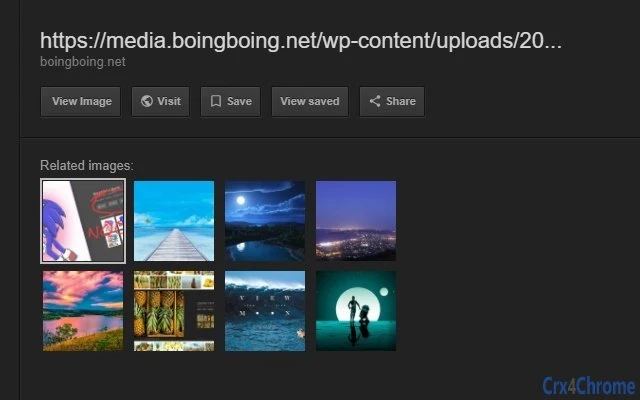
The software is a browser extension designed to restore the "View Image" button in Google Images, a feature that was removed in early 2018 following pressure from Getty Images. This functionality had allowed users to directly view full-resolution images without navigating through third-party websites. The extension aims to address user frustration caused by the removal of this tool, which impacted workflows for researchers, content creators, and anyone relying on efficient image discovery. It is intended for individuals who frequently use Google Images for visual research or content sourcing and value direct access to original image files. The developer did not provide additional background information, and the extension operates independently of Google’s official services. Its purpose is strictly functional, with no additional features beyond restoring the missing button. Real-world use cases include academic research, graphic design projects, and media content curation where direct image access is essential. The extension does not alter Google’s search results or metadata but acts as a frontend layer to reinstate a previously available interface element.
Key Features & Capabilities
- Restores the "View Image" button in Google Images search results, allowing users to access full-resolution images directly.
- Works with Google Images' current interface as of February 18, 2018, based on the extension’s release date and known compatibility.
- Lightweight design with a file size of 500 KB, minimizing impact on browser performance.
- Browser-agnostic functionality for Windows, Mac, and Linux users, supporting multiple platforms.
- Non-invasive operation that does not modify Google’s content or redirect users to unauthorized websites.
The extension functions by injecting a small script into the Google Images page that re-enables the button previously removed. This is particularly useful for users who rely on quick access to high-quality images without being funneled through external sites. For example, a designer sourcing reference images can now view the original file with a single click. Similarly, a student conducting visual research can bypass unnecessary navigation steps. The tool does not cache images, collect data, or require authentication. It operates entirely within the browser’s context and is designed to be temporary, reflecting the volatile nature of browser extensions dependent on dynamic web interfaces.
User Interface, Workflow & Performance
The extension integrates seamlessly into the browser’s interface, appearing as a standard add-on in the extensions menu. Users can enable or disable it with a single toggle, and no configuration options are required. The workflow is straightforward: after installation, the "View Image" button reappears on Google Images results pages without additional steps. Navigation remains unchanged, and the extension does not interfere with standard browsing behavior. The UI is minimal, with no visible interface elements beyond the button itself. Performance is expected to be efficient due to the small file size and lack of background processes. The developer did not specify resource usage details, so exact CPU or RAM behavior cannot be confirmed. However, based on general software behavior patterns, the extension should consume minimal system resources. Stability is likely consistent with typical browser extensions, though its functionality depends on Google’s HTML structure, which may change at any time. No reported crashes or errors were mentioned in the provided information.
Compatibility & System Requirements
The extension is compatible with Windows, Mac, and Linux operating systems. It supports the latest versions of major browsers as of its release date in February 2018, though specific browser versions were not listed. The installation size is 500 KB, which is small and suitable for most systems. Exact system requirements were not listed, and no hardware specifications were provided. Compatibility information was partially provided, with platform support confirmed for desktop environments. The extension does not require administrative privileges for installation and can be added through standard browser extension stores. Users should note that the tool’s functionality is dependent on Google’s interface, which may be updated without notice, potentially affecting compatibility. The developer did not provide any details about future updates or long-term support.
Pros and Cons
Pros
- Restores a widely used and missed feature in Google Images.
- Small file size (500 KB) ensures minimal impact on system performance.
- Available for Windows, Mac, and Linux users.
- Free to use with no hidden costs or subscriptions.
- Non-invasive and does not collect user data.
Cons
- Functionality depends on Google’s HTML structure, which may change at any time.
- No official support or developer contact information provided.
- Not endorsed by Google or Getty Images.
- Limited to Google Images and does not work on other search platforms.
- May become obsolete if Google implements a permanent solution.
FAQ Section
Is this extension safe to use?
The extension operates within the browser’s security model and does not access personal files or transmit data. It only modifies the display of the "View Image" button on Google Images pages. No security risks were reported in the provided information.
Does this work on all browsers?
Compatibility was confirmed for major browsers as of February 18, 2018, but specific browser names and versions were not listed. The extension is designed to work with browsers that support Chrome extensions.
Can I update this extension automatically?
Automatic updates depend on the browser’s extension management system. If the extension is installed through a standard browser store, updates may be delivered automatically. However, no information was provided about update frequency or maintenance.
Is the extension free?
Yes, the extension is available at no cost. It does not require payment, subscription, or in-app purchases.
Does this extension work offline?
The extension requires an active internet connection to function, as it operates on Google Images pages. It cannot be used without access to the web.
Final Thoughts
This browser extension delivers a focused and practical solution to a widely reported user experience issue. By restoring the "View Image" button in Google Images, it directly addresses a gap left by corporate decisions that prioritized content licensing over user convenience. Its lightweight design, cross-platform support, and zero cost make it a compelling choice for anyone who values efficiency in image research. While its long-term viability is uncertain due to reliance on Google’s dynamic interface, it remains a functional tool as of its release date. The lack of developer contact or official support is a notable limitation, but the extension’s simplicity reduces the need for complex management. For users seeking a no-frills, immediate fix to a broken workflow, this tool is a reliable option. Download Restore Google Images' View Image Button now.
Guides & Tutorials for View Image' Button Extension for Chrome
How to install View Image' Button Extension for Chrome
- Click the Preview / Download button above.
- Once redirected, accept the terms and click Install.
- Wait for the View Image' Button Extension for Chrome download to finish on your device.
How to use View Image' Button Extension for Chrome
This software is primarily used for its core features described above. Open the app after installation to explore its capabilities.
User Reviews for View Image' Button Extension for Chrome 0
No reviews found





